
别再用数据库统计访问量了!Java+Redis 3 大方案(Hash/Bitmap/HLL)实战:12KB 扛住亿级用户
来源:别再用数据库统计访问量了!Java+Redis 3 大方案(Hash/Bitmap/HLL)实战:12KB 扛住亿级用户
一、文档概述
1.1 文档目的
本文档详细介绍 Java 开发环境下,基于 Redis 实现用户访问量统计的三种核心方案(Hash、Bitmap、HyperLogLog),包含方案原理、核心 API 调用、完整代码示例及选型建议,为实际项目开发提供可复用的技术方案。
1.2 技术栈依赖
Redis 版本:≥ 2.8.9(支持 HyperLogLog)
Java 版本:≥ JDK 1.8
Redis 客户端:
基础客户端:Jedis 3.10.0(同步操作,适合简单场景)
Spring 生态:Spring Data Redis 2.7.x(整合 Spring Boot,适合企业级项目)
构建工具:Maven/Gradle(示例用 Maven)
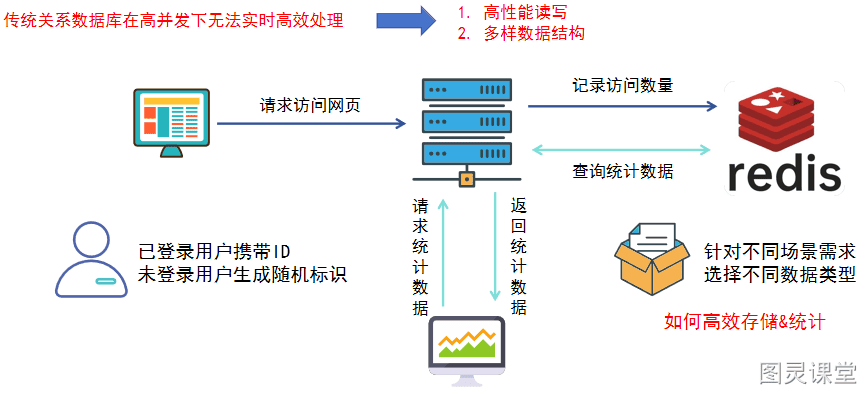
二、前置知识:为什么选择 Redis 统计访问量?
2.1 传统数据库痛点
- 高并发下写入 / 查询性能瓶颈(磁盘 IO 开销大,每秒 QPS 通常 ≤ 1000);
- 频繁统计操作(如
count(*))会锁表,影响业务可用性; - 无法高效支持 “去重统计”“范围统计” 等复杂需求。
2.2 Redis 核心优势
- 高性能:基于内存操作,写入 / 查询响应时间 ≤ 1ms,单机 QPS 可达 10 万 +;
- 多样数据结构:Hash(精准存储)、Bitmap(省内存)、HyperLogLog(极致省内存)覆盖不同场景;
- 原生支持统计命令:无需手动实现去重、计数逻辑,直接调用 API 即可。
三、方案一:Hash 方案(精准统计・低并发适用)
3.1 方案原理
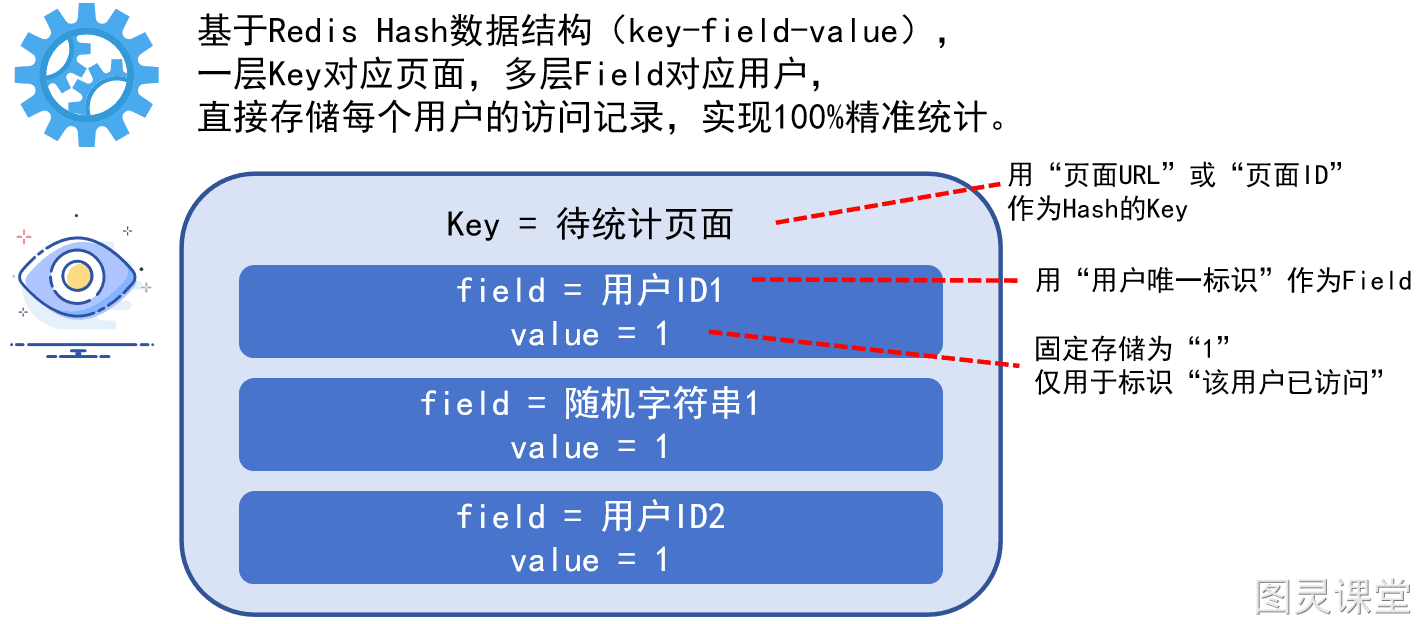
基于 Redis Hash 数据结构(key-field-value),一层 Key 对应页面,多层 Field 对应用户,实现 100% 精准去重统计:
- Key:待统计页面标识(如
page:index、page:article:1001); - Field:用户唯一标识(已登录用户用 ID,未登录用户用随机串);
- Value:固定为
1(仅用于标识 “用户已访问”,无额外业务含义)。
3.2 核心 Redis 命令
命令
作用
Java 客户端对应方法
HSET key field 1
记录用户访问(不存在则新增,存在则覆盖)jedis.hset(key, field, "1")
HLEN key
统计页面总访问量(返回 Field 总数)jedis.hlen(key)
HEXISTS key field
检查用户是否已访问(返回 1/0)jedis.hexists(key, field)
3.3 Java 代码实现
3.3.1 基础版(Jedis 客户端)
1. 引入 Maven 依赖
<dependency>
    <groupId>redis.clients</groupId>
    <artifactId>jedis</artifactId>
    <version>3.10.0</version>
</dependency>
2. 工具类实现
import redis.clients.jedis.Jedis;
import redis.clients.jedis.exceptions.JedisConnectionException;
import java.util.UUID;

/**
 * Redis Hash 方案统计用户访问量工具类
 */
public class RedisHashVisitStats {
    // Redis 连接配置(实际项目建议放配置文件)
    private static final String REDIS_HOST = "localhost";
    private static final int REDIS_PORT = 6379;
    private static final int REDIS_TIMEOUT = 2000;

    /**
     * 记录用户访问(核心方法)
     * @param pageKey 页面标识(如 "page:index")
     * @param userId 已登录用户 ID(未登录传 null)
     * @return 是否新增访问记录(true:首次访问,false:重复访问)
     */
    public boolean recordVisit(String pageKey, String userId) {
        // 未登录用户生成 32 位随机标识(基于 UUID)
        String userIdentifier = userId == null ?
            UUID.randomUUID().toString().replace("-", "") : userId;

        try (Jedis jedis = new Jedis(REDIS_HOST, REDIS_PORT, REDIS_TIMEOUT)) {
            // HSET 命令:存在返回 0(重复访问),不存在返回 1(首次访问)
            Long result = jedis.hset(pageKey, userIdentifier, "1");
            return result == 1;
        } catch (JedisConnectionException e) {
            // 实际项目需添加日志告警(如 ELK 日志)
            System.err.println("Redis 连接异常:" + e.getMessage());
            throw new RuntimeException("统计访问量失败", e);
        }
    }

    /**
     * 统计页面总访问量(去重后)
     * @param pageKey 页面标识
     * @return 总访问用户数
     */
    public long getVisitCount(String pageKey) {
        try (Jedis jedis = new Jedis(REDIS_HOST, REDIS_PORT, REDIS_TIMEOUT)) {
            return jedis.hlen(pageKey);
        } catch (JedisConnectionException e) {
            System.err.println("Redis 连接异常:" + e.getMessage());
            throw new RuntimeException("查询访问量失败", e);
        }
    }

    /**
     * 检查用户是否已访问该页面
     * @param pageKey 页面标识
     * @param userId 已登录用户 ID(未登录传随机串)
     * @return true:已访问,false:未访问
     */
    public boolean checkUserVisited(String pageKey, String userId) {
        String userIdentifier = userId == null ?
            UUID.randomUUID().toString().replace("-", "") : userId;

        try (Jedis jedis = new Jedis(REDIS_HOST, REDIS_PORT, REDIS_TIMEOUT)) {
            return jedis.hexists(pageKey, userIdentifier);
        } catch (JedisConnectionException e) {
            System.err.println("Redis 连接异常:" + e.getMessage());
            throw new RuntimeException("检查用户访问状态失败", e);
        }
    }

    // 测试方法
    public static void main(String[] args) {
        RedisHashVisitStats stats = new RedisHashVisitStats();
        String pageKey = "page:article:1001";

        // 1. 记录已登录用户访问
        boolean isNewVisit1 = stats.recordVisit(pageKey, "user_12345");
        System.out.println("用户 user_12345 是否首次访问:" + isNewVisit1); // true

        // 2. 记录未登录用户访问
        boolean isNewVisit2 = stats.recordVisit(pageKey, null);
        System.out.println("未登录用户是否首次访问:" + isNewVisit2); // true

        // 3. 重复访问(验证去重)
        boolean isNewVisit3 = stats.recordVisit(pageKey, "user_12345");
        System.out.println("用户 user_12345 重复访问:" + isNewVisit3); // false

        // 4. 统计总访问量
        long totalCount = stats.getVisitCount(pageKey);
        System.out.println("页面 " + pageKey + " 总访问量:" + totalCount); // 2

        // 5. 检查用户是否访问
        boolean hasVisited = stats.checkUserVisited(pageKey, "user_12345");
        System.out.println("用户 user_12345 是否访问:" + hasVisited); // true
    }
}
3.3.2 Spring Boot 整合版(Spring Data Redis)
1. 引入 Maven 依赖
<!-- Spring Boot 父依赖 -->
<parent>
    <groupId>org.springframework.boot</groupId>
    <artifactId>spring-boot-starter-parent</artifactId>
    <version>2.7.10</version>
    <relativePath/>
</parent>

<!-- Spring Data Redis 依赖 -->
<dependency>
    <groupId>org.springframework.boot</groupId>
    <artifactId>spring-boot-starter-data-redis</artifactId>
</dependency>

<!-- 连接池依赖(优化 Redis 连接性能) -->
<dependency>
    <groupId>org.apache.commons</groupId>
    <artifactId>commons-pool2</artifactId>
</dependency>
2. 配置 Redis(application.yml)
spring:
  redis:
    host: localhost
    port: 6379
    timeout: 2000ms # 连接超时
    lettuce: # 基于 Lettuce 客户端(Spring Data Redis 默认)
      pool:
        max-active: 8 # 最大连接数
        max-idle: 8 # 最大空闲连接
        min-idle: 2 # 最小空闲连接
        max-wait: -1ms # 连接池最大阻塞等待时间(-1 表示无限制)
3. 服务层实现
import org.springframework.data.redis.core.HashOperations;
import org.springframework.data.redis.core.RedisTemplate;
import org.springframework.stereotype.Service;
import javax.annotation.Resource;
import java.util.UUID;

/**
 * Spring Boot 整合 Redis Hash 方案统计服务
 */
@Service
public class HashVisitStatsService {
    // 注入 RedisTemplate(String 类型键值对)
    @Resource
    private RedisTemplate<String, String> redisTemplate;

    /**
     * 记录用户访问
     */
    public boolean recordVisit(String pageKey, String userId) {
        String userIdentifier = userId == null ?
            UUID.randomUUID().toString().replace("-", "") : userId;

        // 获取 Hash 操作对象
        HashOperations<String, String, String> hashOps = redisTemplate.opsForHash();
        // 若 Field 不存在,返回 null(首次访问);存在则返回旧值(重复访问)
        String oldValue = hashOps.putIfAbsent(pageKey, userIdentifier, "1");
        return oldValue == null;
    }

    /**
     * 统计总访问量
     */
    public long getVisitCount(String pageKey) {
        HashOperations<String, String, String> hashOps = redisTemplate.opsForHash();
        return hashOps.size(pageKey);
    }

    /**
     * 检查用户是否访问
     */
    public boolean checkUserVisited(String pageKey, String userId) {
        String userIdentifier = userId == null ?
            UUID.randomUUID().toString().replace("-", "") : userId;

        HashOperations<String, String, String> hashOps = redisTemplate.opsForHash();
        return hashOps.hasKey(pageKey, userIdentifier);
    }
}
4. 控制层测试(可选)
import org.springframework.web.bind.annotation.*;
import javax.annotation.Resource;

@RestController
@RequestMapping("/api/visit")
public class VisitStatsController {
    @Resource
    private HashVisitStatsService hashVisitStatsService;

    // 记录访问(示例:GET 请求,实际项目建议用 POST)
    @GetMapping("/record")
    public String recordVisit(@RequestParam String pageKey,
                              @RequestParam(required = false) String userId) {
        boolean isNewVisit = hashVisitStatsService.recordVisit(pageKey, userId);
        return isNewVisit ? "记录访问成功(首次访问)" : "记录访问成功(重复访问)";
    }

    // 查询访问量
    @GetMapping("/count")
    public String getVisitCount(@RequestParam String pageKey) {
        long count = hashVisitStatsService.getVisitCount(pageKey);
        return "页面 " + pageKey + " 总访问量:" + count;
    }
}
3.4 方案优缺点
优点
缺点
数据 100% 精准,无误差
内存占用随用户增长线性增加(100 万用户约 100MB)
支持单个用户访问状态查询
高并发下 Field 过多时,
HLEN查询性能下降实现逻辑简单,易维护
不支持多页面统计结果合并(需手动实现)
3.5 适用场景
- 用户规模 ≤ 10 万级(如个人博客详情页、企业内部 OA 页面);
- 对统计准确性要求 100%(如会员专属页面访问验证)。
四、方案二:Bitmap 方案(省内存・中高并发适用)
4.1 方案原理
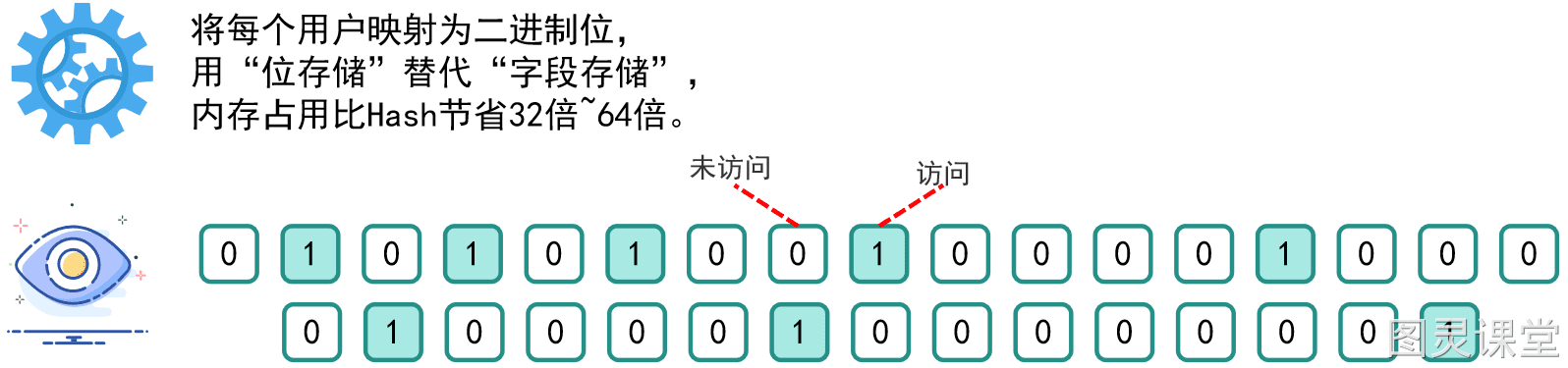
将每个用户映射为 二进制位(bit),用 1 表示 “已访问”,0 表示 “未访问”,通过 “位存储” 替代 “字段存储”,内存占用比 Hash 节省 32~64 倍:
- 核心映射规则:用户标识(ID / 随机串)→ 哈希函数 → 连续整数索引 → 对应 bit 位;
- 内存计算:1 字节 = 8 bit(可存 8 个用户),1 亿用户仅需~12MB 内存。
4.2 核心 Redis 命令
命令
作用
Java 客户端对应方法
SETBIT key offset 1
记录用户访问(offset 为用户映射的索引)jedis.setbit(key, offset, true)
BITCOUNT key
统计总访问量(返回 bit 位中 1 的总数)jedis.bitcount(key)
GETBIT key offset
检查用户是否访问(返回 true/false)jedis.getbit(key, offset)
BITCOUNT key start end
范围统计(统计 [start, end] 字节内 1 的个数)jedis.bitcount(key, start, end)
4.3 Java 代码实现
4.3.1 基础版(Jedis 客户端)
import redis.clients.jedis.Jedis;
import java.nio.charset.StandardCharsets;
import java.security.MessageDigest;
import java.security.NoSuchAlgorithmException;
import java.util.UUID;

/**
 * Redis Bitmap 方案统计用户访问量工具类
 */
public class RedisBitmapVisitStats {
    private static final String REDIS_HOST = "localhost";
    private static final int REDIS_PORT = 6379;
    private static final int REDIS_TIMEOUT = 2000;
    // 最大索引(避免 ID 稀疏导致内存浪费,此处设为 1 亿)
    private static final long MAX_OFFSET = 100_000_000L;

    /**
     * 用户标识映射为 bit 位索引(解决 ID 稀疏问题)
     * @param userIdentifier 用户标识(ID/随机串)
     * @return 0 ~ MAX_OFFSET 范围内的整数索引
     */
    private long getUserOffset(String userIdentifier) {
        try {
            // 1. 对用户标识进行 MD5 哈希(得到 16 字节数组)
            MessageDigest md = MessageDigest.getInstance("MD5");
            byte[] hashBytes = md.digest(userIdentifier.getBytes(StandardCharsets.UTF_8));

            // 2. 取哈希值的低 8 字节(64 位),转为长整数
            long hashValue = 0;
            for (int i = 0; i < 8; i++) {
                hashValue |= ((long) (hashBytes[i] & 0xFF)) << (8 * i);
            }

            // 3. 取绝对值并对 MAX_OFFSET 取模,确保索引在范围内
            return Math.abs(hashValue) % MAX_OFFSET;
        } catch (NoSuchAlgorithmException e) {
            throw new RuntimeException("哈希算法异常", e);
        }
    }

    /**
     * 记录用户访问
     */
    public boolean recordVisit(String pageKey, String userId) {
        String userIdentifier = userId == null ?
            UUID.randomUUID().toString().replace("-", "") : userId;
        long offset = getUserOffset(userIdentifier);

        try (Jedis jedis = new Jedis(REDIS_HOST, REDIS_PORT, REDIS_TIMEOUT)) {
            // SETBIT 命令:返回修改前的位值(false:首次访问,true:重复访问)
            boolean oldValue = jedis.getbit(pageKey, offset);
            jedis.setbit(pageKey, offset, true);
            return !oldValue;
        } catch (Exception e) {
            System.err.println("Redis 操作异常:" + e.getMessage());
            throw new RuntimeException("统计访问量失败", e);
        }
    }

    /**
     * 统计总访问量
     */
    public long getVisitCount(String pageKey) {
        try (Jedis jedis = new Jedis(REDIS_HOST, REDIS_PORT, REDIS_TIMEOUT)) {
            return jedis.bitcount(pageKey);
        } catch (Exception e) {
            System.err.println("Redis 操作异常:" + e.getMessage());
            throw new RuntimeException("查询访问量失败", e);
        }
    }

    /**
     * 范围统计(如统计某时段内的访问量,需按时间段拆分 pageKey)
     * @param pageKey 页面标识(如 "page:index:20240520")
     * @param start 起始字节(0 表示从开头)
     * @param end 结束字节(-1 表示到末尾)
     */
    public long getRangeVisitCount(String pageKey, long start, long end) {
        try (Jedis jedis = new Jedis(REDIS_HOST, REDIS_PORT, REDIS_TIMEOUT)) {
            return jedis.bitcount(pageKey, start, end);
        } catch (Exception e) {
            System.err.println("Redis 操作异常:" + e.getMessage());
            throw new RuntimeException("范围统计访问量失败", e);
        }
    }

    // 测试方法
    public static void main(String[] args) {
        RedisBitmapVisitStats stats = new RedisBitmapVisitStats();
        String pageKey = "page:index:20240520";

        // 1. 记录访问
        boolean isNew1 = stats.recordVisit(pageKey, "user_12345");
        boolean isNew2 = stats.recordVisit(pageKey, null);
        boolean isNew3 = stats.recordVisit(pageKey, "user_12345"); // 重复访问
        System.out.println("首次访问 1:" + isNew1); // true
        System.out.println("首次访问 2:" + isNew2); // true
        System.out.println("重复访问:" + isNew3); // false

        // 2. 统计总访问量
        long total = stats.getVisitCount(pageKey);
        System.out.println("总访问量:" + total); // 2

        // 3. 范围统计(统计前 100 字节内的访问量,即前 800 个用户)
        long rangeTotal = stats.getRangeVisitCount(pageKey, 0, 100);
        System.out.println("范围访问量:" + rangeTotal); // 2
    }
}
4.3.2 Spring Boot 整合版
import org.springframework.data.redis.core.RedisTemplate;
import org.springframework.stereotype.Service;
import javax.annotation.Resource;
import java.nio.charset.StandardCharsets;
import java.security.MessageDigest;
import java.security.NoSuchAlgorithmException;
import java.util.UUID;

@Service
public class BitmapVisitStatsService {
    @Resource
    private RedisTemplate<String, Boolean> redisTemplate; // 存储布尔值(对应 bit 位)
    private static final long MAX_OFFSET = 100_000_000L;

    /**
     * 用户标识映射为 bit 位索引
     */
    private long getUserOffset(String userIdentifier) {
        try {
            MessageDigest md = MessageDigest.getInstance("MD5");
            byte[] hashBytes = md.digest(userIdentifier.getBytes(StandardCharsets.UTF_8));
            long hashValue = 0;
            for (int i = 0; i < 8; i++) {
                hashValue |= ((long) (hashBytes[i] & 0xFF)) << (8 * i);
            }
            return Math.abs(hashValue) % MAX_OFFSET;
        } catch (NoSuchAlgorithmException e) {
            throw new RuntimeException("哈希算法异常", e);
        }
    }

    /**
     * 记录用户访问
     */
    public boolean recordVisit(String pageKey, String userId) {
        String userIdentifier = userId == null ?
            UUID.randomUUID().toString().replace("-", "") : userId;
        long offset = getUserOffset(userIdentifier);

        // 获取 Bitmap 操作(Spring Data Redis 无单独 Bitmap 类,通过 opsForValue 间接操作)
        Boolean oldValue = redisTemplate.opsForValue().getBit(pageKey, offset);
        redisTemplate.opsForValue().setBit(pageKey, offset, true);
        return oldValue == null || !oldValue; // oldValue 为 null 表示首次访问
    }

    /**
     * 统计总访问量
     */
    public Long getVisitCount(String pageKey) {
        // Spring Data Redis 需通过 RedisCallback 执行原生 BITCOUNT 命令
        return redisTemplate.execute((connection) -> {
            byte[] keyBytes = pageKey.getBytes(StandardCharsets.UTF_8);
            return connection.bitCount(keyBytes);
        });
    }
}
4.4 方案优缺点
优点
缺点
内存占用极小(1 亿用户~12MB)
哈希映射可能导致微小冲突(误差可通过多 Bitmap 优化至 ≤ 0.1%)
写入 / 查询性能高(支持每秒 10 万 + 操作)
用户 ID 稀疏且未哈希处理时,会浪费内存
支持范围统计和位运算(如多页面交集统计)
不支持存储用户访问时间等额外信息
4.5 适用场景
- 用户规模 10 万~1 亿级(如电商促销活动页、新闻 APP 首页);
- 中高并发场景(每秒写入 ≤ 10 万),需平衡内存和性能。
五、方案三:HyperLogLog 方案(极致省内存・海量用户适用)
5.1 方案原理
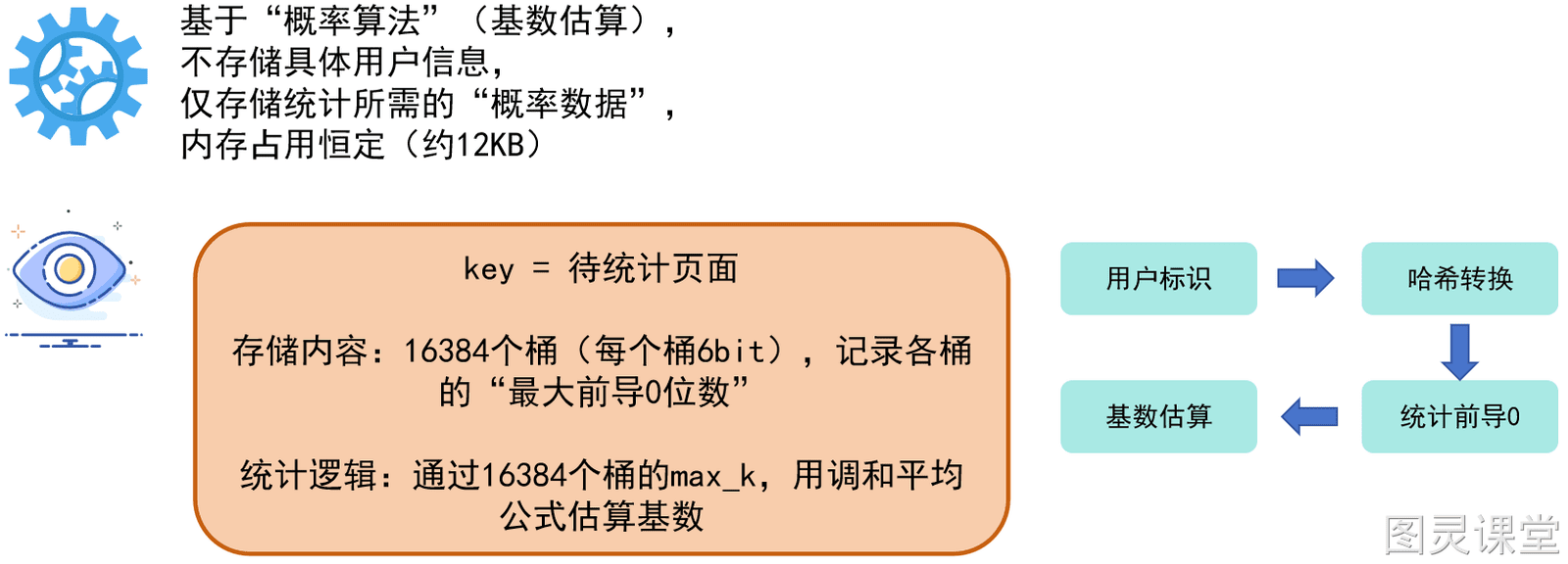
基于 概率算法(基数估算),不存储具体用户标识,仅存储 “概率统计数据”(16384 个桶,每个桶 6 bit),内存占用恒定~12KB(无论用户规模):
- 核心逻辑:用户标识 → 哈希转换 → 统计哈希值 “最长前导 0 个数” → 基于公式估算不重复用户数(误差率 ≈ 0.81%);
- 优势:12KB 可统计 1 亿 + 用户,内存效率远超 Hash 和 Bitmap。
5.2 核心 Redis 命令
命令
作用
Java 客户端对应方法
PFADD key element1 element2
批量记录用户访问(element 为用户标识)jedis.pfadd(key, elements)
PFCOUNT key
估算总访问量(返回基数估算值)jedis.pfcount(key)
PFMERGE destKey srcKey1 srcKey2
合并多页面统计结果(如合并首页和商品页)jedis.pfmerge(destKey, srcKeys)
5.3 Java 代码实现
5.3.1 基础版(Jedis 客户端)
import redis.clients.jedis.Jedis;
import java.util.UUID;

/**
 * Redis HyperLogLog 方案统计用户访问量工具类
 */
public class RedisHLLVisitStats {
    private static final String REDIS_HOST = "localhost";
    private static final int REDIS_PORT = 6379;
    private static final int REDIS_TIMEOUT = 2000;

    /**
     * 批量记录用户访问(支持单次添加多个用户)
     * @param pageKey 页面标识
     * @param userIds 已登录用户 ID 数组(未登录用户需先生成随机串)
     * @return 是否有新用户被添加(true:有新增,false:无新增)
     */
    public boolean batchRecordVisit(String pageKey, String... userIds) {
        // 处理未登录用户(此处示例:若 userIds 含 null,替换为随机串)
        String[] userIdentifiers = new String[userIds.length];
        for (int i = 0; i < userIds.length; i++) {
            userIdentifiers[i] = userIds[i] == null ?
                UUID.randomUUID().toString().replace("-", "") : userIds[i];
        }

        try (Jedis jedis = new Jedis(REDIS_HOST, REDIS_PORT, REDIS_TIMEOUT)) {
            // PFADD 命令:返回 1 表示有新用户,0 表示无新用户
            Long result = jedis.pfadd(pageKey, userIdentifiers);
            return result == 1;
        } catch (Exception e) {
            System.err.println("Redis 操作异常:" + e.getMessage());
            throw new RuntimeException("批量统计访问量失败", e);
        }
    }

    /**
     * 估算页面总访问量
     */
    public long estimateVisitCount(String pageKey) {
        try (Jedis jedis = new Jedis(REDIS_HOST, REDIS_PORT, REDIS_TIMEOUT)) {
            return jedis.pfcount(pageKey);
        } catch (Exception e) {
            System.err.println("Redis 操作异常:" + e.getMessage());
            throw new RuntimeException("估算访问量失败", e);
        }
    }

    /**
     * 合并多页面统计结果(如合并首页和商品页的访问量)
     * @param destKey 合并后的目标 Key
     * @param srcKeys 待合并的源页面 Key 数组
     */
    public void mergeVisitStats(String destKey, String... srcKeys) {
        try (Jedis jedis = new Jedis(REDIS_HOST, REDIS_PORT, REDIS_TIMEOUT)) {
            jedis.pfmerge(destKey, srcKeys);
        } catch (Exception e) {
            System.err.println("Redis 操作异常:" + e.getMessage());
            throw new RuntimeException("合并访问量统计失败", e);
        }
    }

    // 测试方法
    public static void main(String[] args) {
        RedisHLLVisitStats stats = new RedisHLLVisitStats();
        String indexKey = "page:index";
        String productKey = "page:product:1001";
        String totalKey = "page:total";

        // 1. 记录首页访问
        stats.batchRecordVisit(indexKey, "user_123", "user_456", null); // 3 个用户
        // 2. 记录商品页访问
        stats.batchRecordVisit(productKey, "user_456", "user_789", null); // 3 个用户(含重复)

        // 3. 估算各页面访问量
        long indexCount = stats.estimateVisitCount(indexKey);
        long productCount = stats.estimateVisitCount(productKey);
        System.out.println("首页估算访问量:" + indexCount); // 3(误差极小)
        System.out.println("商品页估算访问量:" + productCount); // 3(误差极小)

        // 4. 合并统计(去重后总用户数应为 5:123、456、789 + 2 个未登录用户)
        stats.mergeVisitStats(totalKey, indexKey, productKey);
        long totalCount = stats.estimateVisitCount(totalKey);
        System.out.println("合并后总估算访问量:" + totalCount); // 5(误差 ≤ 0.81%)
    }
}
5.3.2 Spring Boot 整合版
import org.springframework.data.redis.core.RedisTemplate;
import org.springframework.stereotype.Service;
import javax.annotation.Resource;
import java.util.UUID;

@Service
public class HLLVisitStatsService {
    @Resource
    private RedisTemplate<String, String> redisTemplate;

    /**
     * 批量记录用户访问
     */
    public boolean batchRecordVisit(String pageKey, String... userIds) {
        String[] userIdentifiers = new String[userIds.length];
        for (int i = 0; i < userIds.length; i++) {
            userIdentifiers[i] = userIds[i] == null ?
                UUID.randomUUID().toString().replace("-", "") : userIds[i];
        }

        // Spring Data Redis 直接提供 HyperLogLog 操作接口
        Long result = redisTemplate.opsForHyperLogLog().add(pageKey, userIdentifiers);
        return result != null && result == 1;
    }

    /**
     * 估算总访问量
     */
    public Long estimateVisitCount(String pageKey) {
        return redisTemplate.opsForHyperLogLog().size(pageKey);
    }

    /**
     * 合并多页面统计结果
     */
    public void mergeVisitStats(String destKey, String... srcKeys) {
        redisTemplate.opsForHyperLogLog().union(destKey, srcKeys);
    }
}
5.4 方案优缺点
优点
缺点
内存占用恒定(~12KB,支持 1 亿 + 用户)
统计结果为估算值(误差率 ≈ 0.81%)
写入性能极高(支持每秒百万级批量添加)
不支持单个用户访问状态查询
原生支持多页面统计合并(
PFMERGE)不支持范围统计(需按时间段拆分 Key)
5.5 适用场景
- 用户规模 ≥ 1 亿级(如大型门户网站首页、短视频平台全站访问统计);
- 超高峰值场景(每秒写入 ≥ 10 万),可接受 ≤ 1% 的统计误差。
六、方案选型决策表
决策维度
Hash 方案
Bitmap 方案
HyperLogLog 方案
数据准确性
100% 精准(无误差)
微小偏差(≤ 0.1%)
估算值(≈ 0.81% 误差)
内存占用(1 亿用户)
~1GB
~12MB
~12KB(恒定)
单个用户查询
支持(HEXISTS)
支持(GETBIT)
不支持
多页面合并统计
需手动实现
支持(BITOP)
支持(PFMERGE)
适用用户规模
≤ 10 万级
10 万~1 亿级
≥ 1 亿级
典型业务场景
博客详情页、内部 OA 页面
电商活动页、新闻 APP 首页
大型网站首页、全站统计
Java 客户端易用性
★★★★★
★★★★☆(需处理哈希映射)
★★★★★
七、注意事项
- Redis 集群配置:
- 若用户规模超单机 Redis 承载能力,需部署 Redis Cluster(≥ 3 主 3 从);
- 确保 Key 均匀分布在不同节点(避免单节点压力过大)。
- 数据过期策略:
- 按业务需求设置 Key 过期时间(如统计 “当日访问量”,用
EXPIRE key 86400设置 1 天过期); - 避免 Key 长期堆积导致 Redis 内存溢出。
- 异常处理:
- 生产环境需添加 Redis 连接池(如 JedisPool、Lettuce Pool),避免频繁创建连接;
- 增加降级策略(如 Redis 宕机时,临时用本地缓存记录,恢复后同步)。
- 数据一致性:
- 若需 “最终一致性”(如统计结果允许延迟),可异步同步 Redis 数据到数据库;
- 若需 “强一致性”,需谨慎使用 HyperLogLog(因误差存在),优先选择 Hash 或 Bitmap。
八、附录:常用工具类推荐
- Redis 连接池工具类(JedisPool):
import redis.clients.jedis.Jedis;
import redis.clients.jedis.JedisPool;
import redis.clients.jedis.JedisPoolConfig;

public class JedisPoolUtil {
    private static JedisPool jedisPool;

    static {
        // 连接池配置
        JedisPoolConfig config = new JedisPoolConfig();
        config.setMaxTotal(8);
        config.setMaxIdle(8);
        config.setMinIdle(2);
        config.setMaxWaitMillis(-1);
        config.setTestOnBorrow(true); // 借连接时测试可用性

        // 初始化连接池
        jedisPool = new JedisPool(config, "localhost", 6379, 2000);
    }

    // 获取 Jedis 连接(自动关闭)
    public static <T> T execute(JedisCallback<T> callback) {
        try (Jedis jedis = jedisPool.getResource()) {
            return callback.doInJedis(jedis);
        } catch (Exception e) {
            throw new RuntimeException("Redis 操作异常", e);
        }
    }

    // 回调接口
    public interface JedisCallback<T> {
        T doInJedis(Jedis jedis);
    }
}

// 使用示例
public class Test {
    public static void main(String[] args) {
        // 统计访问量
        long count = JedisPoolUtil.execute(jedis -> jedis.hlen("page:index"));
        System.out.println("总访问量:" + count);
    }
}- 用户标识生成工具类(避免重复):
import java.util.UUID;

public class UserIdentifierUtil {
    /**
     * 生成未登录用户标识(基于 UUID + 时间戳,确保唯一性)
     */
    public static String generateAnonymousId() {
        String uuid = UUID.randomUUID().toString().replace("-", "");
        long timestamp = System.currentTimeMillis();
        return uuid + "_" + timestamp;
    }
}